How to Prevent Desk Pain at Work
A stiff neck during a long video call, aching shoulders on the train home, or low back pain that appears only after a day at the computer can quietly change how you work and live. Learning how to prevent desk pain is not about holding one rigid “perfect” posture all day. It is about creating enough support, movement, and variety for your body to tolerate the demands of your work.
For many professionals in Tokyo, the challenge is compounded by compact workspaces, long commutes, laptop-based meetings, and the pressure to stay available across time zones. The good news is that small, well-chosen adjustments often make a meaningful difference. When pain has already become persistent, a hands-on assessment can also identify why one area keeps becoming overloaded.
Why desk work causes pain
Desk pain rarely comes from a single cause. More often, it develops when the same tissues are asked to do the same job for too long. Your upper back and neck may work continuously to hold your head in front of a screen. Your forearms may stay tense while using a mouse. Your hips remain bent for hours, while the lower back has little opportunity to change position.
This does not mean sitting is inherently harmful or that every ache is caused by “bad posture.” Bodies are adaptable. The difficulty is prolonged stillness, especially when combined with stress, poor sleep, a previous injury, or a workstation that forces you to reach, twist, or look down.
Pain can also become self-perpetuating. When the neck feels sore, people often brace their shoulders. When the lower back feels vulnerable, they may stop moving altogether. Both reactions can increase sensitivity and reduce comfortable mobility over time.
How to prevent desk pain with a better setup
Your workstation should fit you, not the other way around. Start with the changes that reduce unnecessary strain, then refine the details based on how your body responds over a week or two.
Place the screen where your neck can relax
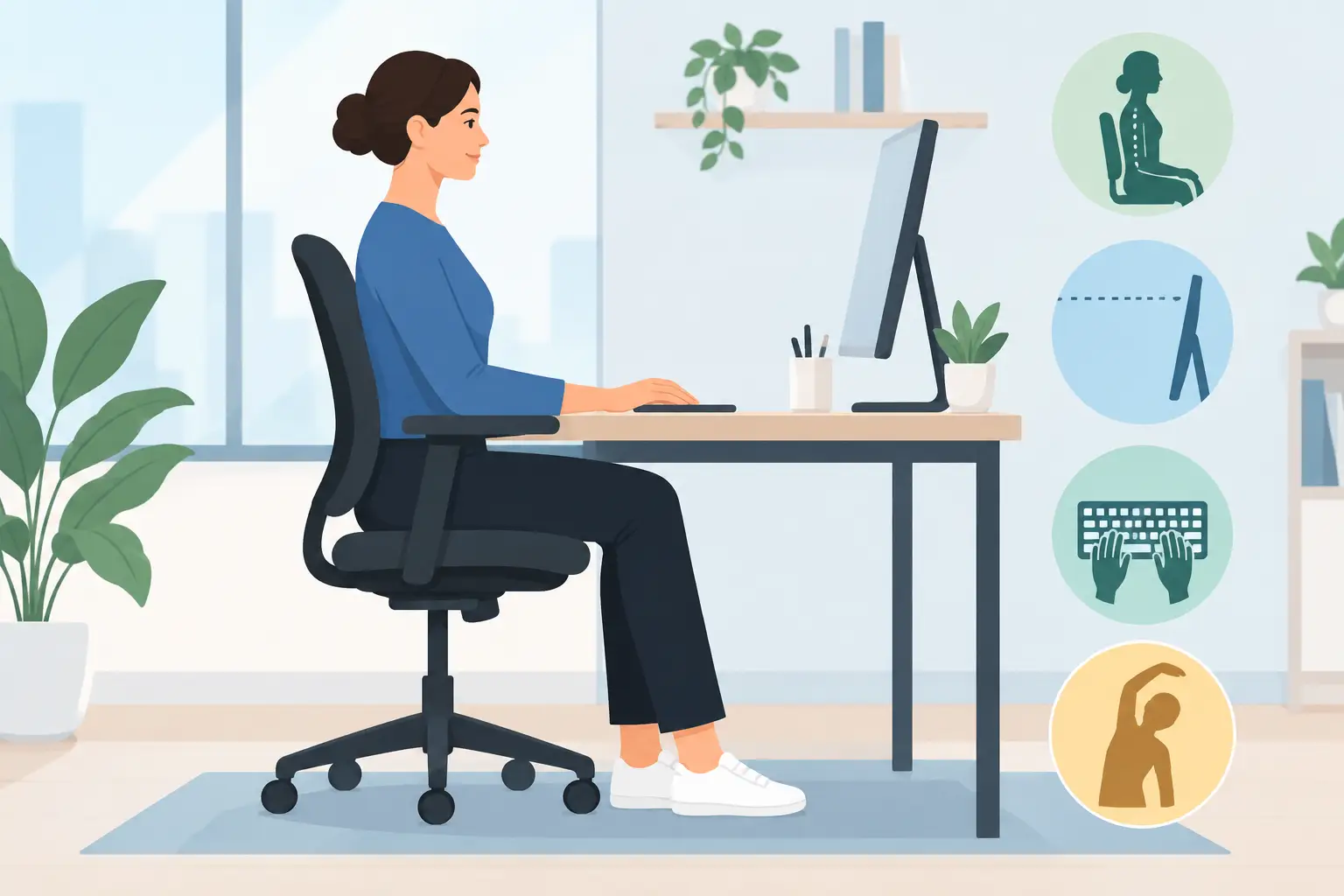
Position your main screen directly in front of you, rather than off to one side. The top third of the display should generally be near eye level, allowing you to look slightly downward without dropping your chin toward your chest. If you use a laptop as your primary computer, raise it with a stable stand or a stack of books and use a separate keyboard and mouse.
A laptop on a dining table is workable for short periods, but it creates a compromise: the screen is too low when the keyboard is at a comfortable height, and the keyboard is too high when the screen is raised. For regular remote work, separating the screen from the keyboard is one of the most useful upgrades you can make.
Let your arms rest close to your body
Adjust your chair so your elbows can stay near your sides and your shoulders do not need to lift toward your ears. Keep the keyboard close enough that you are not reaching forward, and place the mouse beside it rather than far out to the side.
Your wrists do not need to be perfectly straight at every moment, but avoid sustained bending or pressure against a hard desk edge. If your forearm, wrist, or thumb pain is increasing, consider alternating mouse hands for simple tasks, using keyboard shortcuts, or testing a different mouse shape. The best option depends on your hand size, work tasks, and symptoms.
Support the lower back without forcing it
Sit back into the chair so the backrest can support you. A small cushion or rolled towel at the lower back can be helpful if the chair is flat, but it should feel comfortable rather than aggressively arched. Keep both feet supported by the floor or a footrest, particularly if the chair must be raised to suit the desk height.
There is no single hip or knee angle that works for everyone. Some people feel better with the seat slightly higher, while others prefer a more open hip position. Aim for a setup that lets you shift easily and breathe comfortably, rather than one that makes you feel locked in place.
Movement matters more than posture perfection
Even an excellent chair cannot make eight uninterrupted hours of sitting comfortable. The most protective habit is regular variation. Change position before discomfort becomes intense: stand for a phone call, walk to refill your water, or spend a few minutes working from a higher surface.
A practical target is two or three minutes of movement every 30 to 45 minutes. That may sound frequent, but it does not need to interrupt your concentration. Set a quiet reminder, pair the break with the end of a task, or use the time between meetings. Brief movement helps circulation, gives the eyes a break from close focus, and reduces the sense of compression that can build in the neck and back.
Try a few slow shoulder rolls, gentle neck turns, or a short walk rather than forceful stretching. If an exercise causes sharp pain, tingling, or symptoms that travel into an arm or leg, stop and seek professional advice. Stretching through pain is not a reliable way to solve desk-related discomfort.
Build a workday your body can tolerate
Ergonomics are more effective when they are supported by realistic routines. If you regularly skip lunch, answer messages late into the evening, and work through stress without a break, even a carefully adjusted desk may not be enough.
Plan your more demanding screen tasks in blocks, then insert a change of activity. Print and review a document standing up if appropriate. Take walking meetings when privacy allows. Use a headset for longer calls instead of holding a phone between your shoulder and ear. These small decisions reduce repeated loading without requiring a dramatic change to your schedule.
Strength and general activity outside work matter as well. Walking, swimming, resistance training, Pilates, yoga, or a sport you enjoy can improve your confidence in movement and your capacity to handle a sedentary day. There is no single best exercise for desk pain. The best choice is one you can perform regularly, progress gradually, and recover from well.
Sleep is another overlooked factor. A painful neck or back is often more sensitive after poor-quality sleep, high stress, or a demanding travel schedule. Rather than treating pain as a sign that your body is failing, view it as useful feedback that your current workload and recovery may be out of balance.
When desk pain needs individual assessment
A workstation adjustment can help, but it cannot diagnose the source of persistent symptoms. Neck pain may be influenced by jaw tension, headaches, old shoulder injuries, breathing patterns, or stress-related muscle guarding. Low back discomfort may be affected by hip mobility, previous episodes of sciatica, training load, or the way you move outside work.
Individual osteopathic care begins with listening to the pattern of your symptoms: when they occur, what eases them, what aggravates them, and how they affect work, sleep, exercise, and daily life. A whole-body assessment can then guide hands-on treatment and practical recommendations that suit your body and working environment. At Osteopath Tokyo, care is tailored to the individual, with the aim of improving comfort, mobility, and confidence in everyday movement.
Seek prompt medical evaluation for severe pain after trauma, unexplained fever or weight loss, new weakness, numbness that is worsening, loss of bladder or bowel control, or pain that is persistent and severe at night. These symptoms require medical attention rather than self-management alone.
Make the next change easy
Choose one adjustment you can make today: raise your laptop screen, bring your mouse closer, or schedule two movement breaks before lunch. Then notice how your body feels at the end of the day, not only while you are sitting. Consistent, comfortable changes give your body the best chance to feel less guarded and more capable at your desk.